Showing posts with label after effects. Show all posts

Wednesday, 19 January 2011

After Affects lesson 5

How to work with sound!!!

music
voice over/narration
sound effects

itunes
cd
royalty free audio websites
'sound library' in shared folder

FORMATS:
AIFF
WAV
mp3
m4a

if you download a file that is not in this format use SWITCH in applications

File>import> find audio file
will be imported as footage
will be found in project> drag to composition
has a fixed duration and has a length

Audio levels +0.00dB default level
can add key frames fade out or get louder
Waveform
change duration....trip the beginning of file.file still there but wont play
only hear the audio on ram preview


add to render queue>lossless>tick audio button


video with noise


drag asset to layer

Grouping layers together:
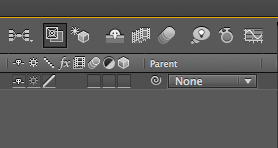
Parent child relationship-add position keyframe to layers.drop down menus>parent>choose one layer>choose another layer in drop down menu

select all layers>parent

nesting composition

Wednesday, 12 January 2011

After effects lesson 4


importing from photoshop>make sure it is RGB

Animated presets >effects and presets>choose preset>select layer> double click

see all layer> U
show all modified UU


layer switches 3/4 buttons
shy switch>simplify layer palet>hides the layer in timeline
Rasterize button>for comp layers:collaps transformation
/ > high quality
fx>turns off all effects
frame blend- interpolates frame content by weight blending
motion blur-simulates shutter duration
adjustment layer- the affects applied to this layer effects only all layers behind it
3d layers.allows this layer to be manipulated in 3 dimentions


get drop down menus press thee three buttons


animation>keyframe assistant>easy ease
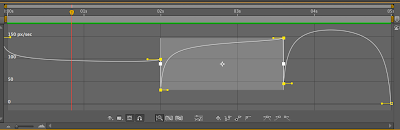
graph editor>speed
shows speed of shape or text.

A video that I made today, learnt how to make a pendulum.


Wednesday, 5 January 2011

after effects lesson 3

Third and final lesson learning about text

There are two ways of adding text

Layer>new>text
or
Type tool>click in composition window and type

the anchor point can be changed by transform. this moves the layer while the anchor point stays where it is on the screen. The pan behind tool can also be used which moves the point itself

to change text as you go along you find the text in the timeline and use source text

animate>range selector allows you to change individual text properties

Mask= whole screen solid layer
Paths=Draw an open ended pen drawing in a text layer.


After effects lesson 2

Lesson two of after effects
First had a reminder of what we learnt in the 1st week with all the basics and whats what.
This lesson we learnt how to import a photoshop and illustrator file in to after effects

First in Photoshop or illustrator you press new file> film and video> AE(PAL DV widescreen square pixels. Illustrator only needs DV widescreen
Guidelines will appear on the art board screen
Inside guide- Title safe zone. you keep all text inside these line and in the middle, this is so when you see it on screen nothing is sniped off and you can see it all
Outside guide- this is the action safe zone. main action is kept within this area


To get a PSD and Ai file to AE:
File- import
find image
footage
flatten image
drag in to after effects timeline
Composition-use layers within the imported image centred round the middle of the screen
Composition Retain- each layer centred around itself, so can rotate or scale independently of the other layers. If it has been opened as a composition the double click on it and it adds the layer to the timeline

Illustrator artwork
If expanding, next to the Ai file in the timeline, there are three check boxes. The second one along rasterizes the image which means its vector quality is retained.

Photoshop artwork
Always make the image the largest you'll ever need it

Changing the speed of a composition

select all key frames
Press alt and click the very first or the last key frame, drag it left or right to make the composition go quicker or slower.

After Effects lesson 1

After effects is a digital motion graphics and compositing software by adobe. Its main purpose os for film and video post production.
On our first lesson of after effects we covered a lot of the basics to get us going.
Here are somethings that I learnt:
Project Panel- organise, view and manage footage. Add assest to this panel which are individual compositions
For Ai and Psd files go file>import>file
PAL= UK standard
NTSC US Standard- different sizes/ sequence speeds to uk
PAL Digital Videos are rectangular pixels.
DV Square pixel= square pixels
For the brief we are doing, silent movie we needs to use PAL D1/DV widescreen Square Pixels

Solid= layer filled with a colour, can be resized
Playback=spacebar...slow if a lot of layers. use RAM preview, plays in real time

reduce quality by clicking on resolution and changing to full, half, quarter.
Layer Properties>Transform>keyframes let you play around with effects

Keyboard shortcuts
Show only the current selected panel
Tild key -'
Layer property shortcuts
P- position
A- Anchor Point
S- scale
R- rotation
T- opacity
O- out point of current layer
I- in point of current layer
B- beginning of work area
N- end of work area
U- Reveal all animated properties
UU- Reveal modified layers
Exporting
Composition>add to render queue
render settings>best settings
Output module- Quicktime